CaseNet MO
If you need to access Missouri court cases, this comprehensive guide will explain how to navigate the CaseNet portal. You will discover how to look up records by party name or case number, check your upcoming court hearing schedule, examine court docket updates, and conveniently access public circuit court records.
This casenetmo.us resource is strictly for informational purposes and does not serve as legal advice. Always speak with a licensed Missouri lawyer for advice specific to your situation. Official court notices are not provided through CaseNet notifications or “Track This Case” alerts.
What is CaseNet ?
Case Net serves as the official online system for Missouri, providing access to public circuit court records. The Missouri Court Automation Program (MCAP) operates this platform, which is overseen by the Office of State Courts Administrator (OSCA) under the Missouri Judicial Branch.
It was created pursuant to Section 476.055 of the Revised Statutes of Missouri (RSMo) to offer researchers, legal professionals, residents, and journalists safe and dependable access to judicial information.
Main Features and Advantages
CaseNet MO delivers free, instantaneous access to public court files across all 114 counties in Missouri. Without needing to register, users can promptly search for appellate, criminal, and civil cases, simplifying the management of various legal affairs online rather than visiting physical courthouses.
Operating under the Missouri casenet Revised Statutes, the portal ensures the public can freely view case details.
How to Utilize the Case.net MO System to Look Up Missouri Court Records
CaseNet stands as the official state judiciary system in Missouri for reviewing Public Circuit Court documentation. Follow these steps to effectively track, view, and search Missouri legal cases.
Jump To : Track Case || Pay Fines || Find Old Cases
Step 1: Navigate to the Official Case.net MO Website
Launch your internet browser and visit the official Case.net MO system: https://www.courts.mo.gov/casenet
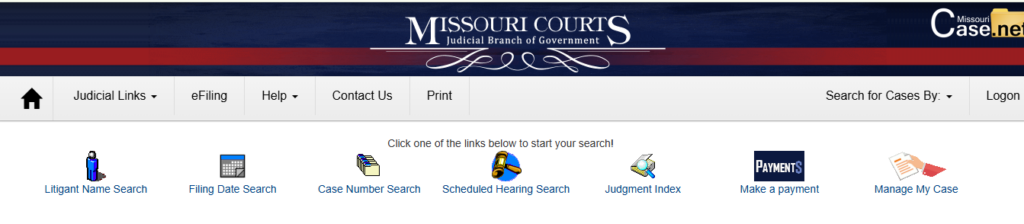
Tip: Save this website to your bookmarks for fast access, ensuring you are using the official .gov site for secure retrieval of Missouri’s public court documents.
Step 2: Select Your Preferred Search Method
Looking up court documents on CaseNet MO is straightforward when you know the available search features. Based on the information you possess, the portal offers four main options.
- Litigant Name Search
- Case Number Search
- Filing Date Search
- Scheduled Hearings Search
1. Litigant Name Search (Most Frequently Used)
Utilize the Litigant Name Search tool if you possess all or part of the name of a business or individual involved in a Missouri legal matter.
Input the last name and then the first name (for instance, Smith, John) to retrieve files related to civil disputes, traffic tickets, or criminal cases. To prevent getting too many results for common names, apply the “County” or “Circuit” filters to restrict your query to targeted regions, such as St. Louis City or Jackson County.
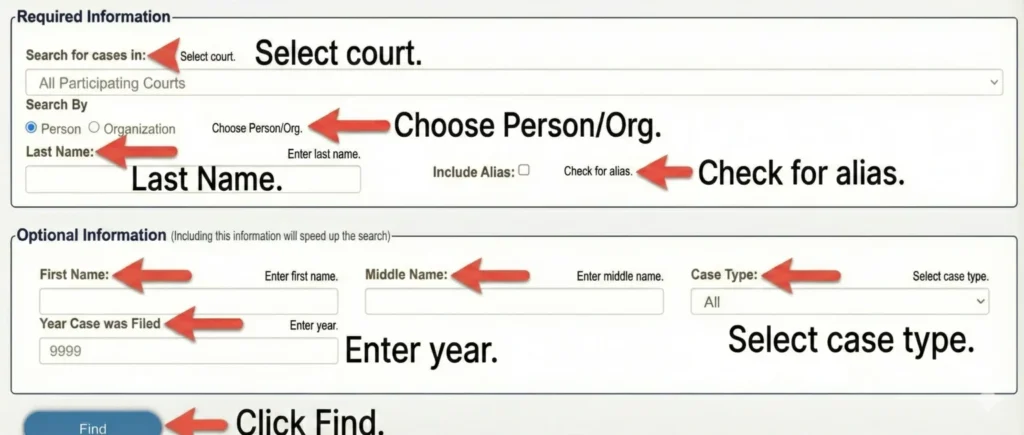
After the results load, select the Case Number to open the complete docket entries, displaying every upcoming hearing, judgment, and motion in order of occurrence.
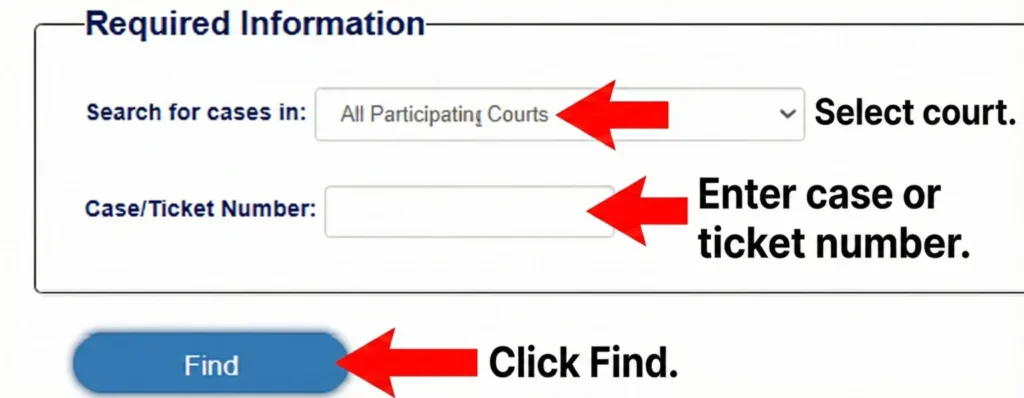
2. Case Number Search (Quickest and Most Precise)
When you already know the specific docket number—like 23AC-CR000123—utilize the Case Number Search to immediately open the entire case file. This includes upcoming court dates, judgments, filings, motions, and docket notes.
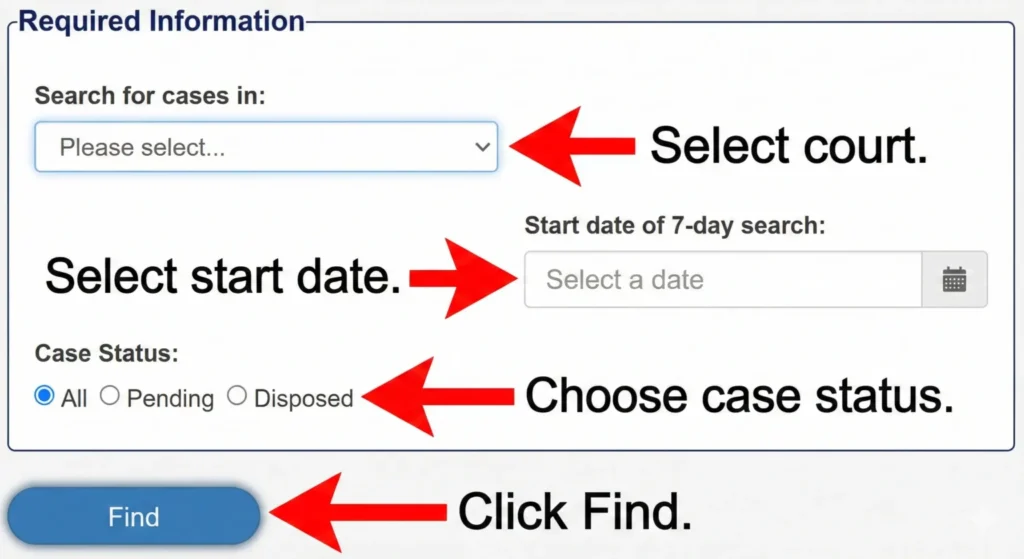
3. Filing Date Search
The Filing Date Search enables you to explore recently submitted cases within Missouri’s judicial system. It is ideal if you have a general idea of the date range or wish to monitor broad court activities, criminal charges, or new civil lawsuits.
4. Scheduled Hearings Search
With the Scheduled Hearings Search Tool, you can verify upcoming court dates by judge, location, or date. This feature is highly beneficial for anyone needing to review the court’s future schedule, confirm appearances, or assist reporters, attorneys, and defendants.
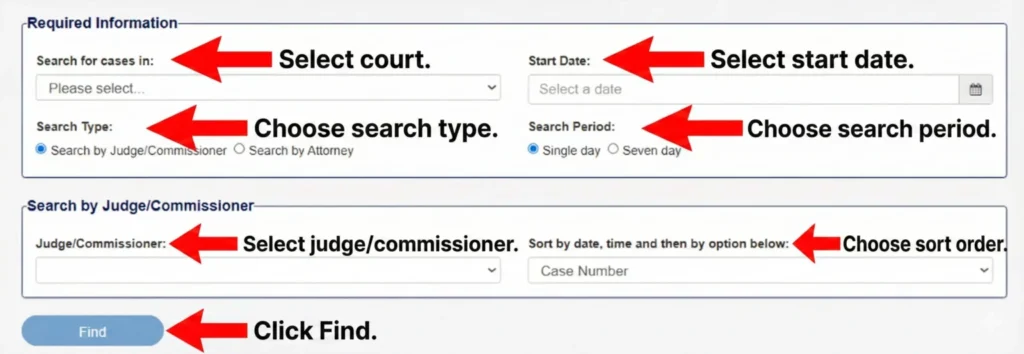
Pro Tip: I recommend beginning with a Litigant Name Search, and subsequently filtering by court type and county to achieve faster and more precise results.
Step 3: Choose the Appropriate Court & Utilize Filters
Since Case.net includes all courts in Missouri, filtering is essential to narrow down your findings—particularly when looking up common names.
Implement filters like:
Step 4: Examine and Monitor Case Information
After accessing the case, you will notice various sections detailing the information:
- Motions
- Orders
- Court filings
- Judgments
- Court notes
Tracking Your Case (#track)
Click on the “Track This Case” tool (indicated by a footprint icon) to get automated alerts regarding:
Verify: Look in your email inbox for a verification link. Failing to click this link means you will not receive any notifications.
How To Remit Court Fees or Fines Online via Pay By Web
People residing in Missouri have the option to securely pay their court fees and fines via the integrated Pay By Web system online. This platform directly connects your payment to your specific case, offering instant confirmation and eliminating the need for a courthouse visit.
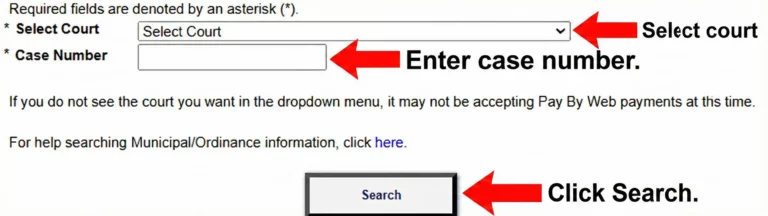
Benefits & Tips: Online payments are processed quickly and tracked automatically, which helps in avoiding penalties for late payments. Should you encounter any difficulties, the Case.net MO platform provides customer assistance. To ensure seamless transactions, always review confirmation protocols and the specific fee schedules of the court.
The Pay By Web platform delivers a transparent, secure, and rapid method for handling and paying court fees and fines throughout Missouri.
Extra Features Offered on CaseNet MO
eFiling for Legal Professionals
Lawyers in Missouri can digitally file legal paperwork through the statewide eFiling portal, which covers documents for civil litigation.
This optimizes the workflow, minimizes delays associated with physical paperwork, and offers immediate submission confirmation. It is particularly beneficial for attorneys managing multiple cases across various counties.
MOVANS Alerts
The Missouri Victim Automated Notification System (MOVANS) gives witnesses and victims the ability to monitor offender custody statuses and get live court updates. Individuals can sign up via the Missouri Case.net portal to obtain alerts through phone, email, or text. These confidential notifications substitute traditional phone alerts with instant updates.
Jury and Inmate Details
The CaseNet MO platform also features Show Me Jury and Inmate Search functionalities. Visitors can review:
- Jury duty timetables
- Instructions for jurors
- Details regarding inmates
- Current custody status
These features enhance communication between the public and the judicial system.
Who Utilizes the MO CaseNet Online Portal?
A diverse demographic across Missouri relies on MO CaseNet Online:
| User Type | Use / Functionality |
|---|---|
| Attorneys & Legal Professionals | Submit documents through eFiling portals; manage multiple cases across city jurisdiction; monitor judge assignments, court deadlines, and notifications. |
| Employees & Self-Represented Individuals | Access personal case information (minor traffic citations, civil dispute cases); pay fines via Pay By Web system; receive automated court updates via email/SMS. |
| Journalists and Researchers | Access public court records for investigative reporting; use historical case data for statistical studies and legal analysis. |
| Legal Analysts & Background Check Professionals | Review case judgments, filings, and court proceedings; perform in-depth case research for clients or organizations. |
Categories of Cases Found on the Missouri Court Website
The Casenet Missouri Court Portal grants access to:
Note: Sealed or older records might necessitate in-person visits to the courthouse.
How to Track Down Missing or Old Missouri Court Records
The online court database in Missouri keeps a continuous chronological log for every case, known as docket entries. These entries document updates, attorney substitutions, hearings, orders, and filings as they happen. Even if the complete documents are not accessible online, you can typically view these logs.
Should a document be absent, it could be:
- Not uploaded yet
- Private or sealed
- Included in an older, offline-stored file
Next Steps: Reach out to the circuit court clerk in the specific county where the case was initiated. Clerks are equipped to help find archived files and provide instructions on how to ask for copies.
Reasons People Access the Missouri Court System
The Casenet judicial portal sees widespread use throughout Missouri for a variety of reasons:
Which Missouri Court Documents Are Restricted from the Public?
The Missouri court system blocks access to legally protected or sensitive court data. Sealed or confidential details are not available to the public via the CaseNet MO database. Public access is strictly confined to permitted records.
Records Excluded Include:
- Juvenile proceedings
- Sealed or expunged documents
- Confidential information regarding domestic violence
- Identities of victims
- Mental health files, financial account details, or Social Security numbers
Why CaseNet MO Is Crucial for Missourians
For numerous individuals living in Missouri, the CaseNet MO platform delivers:
- Transparency
- Convenience
- Reliable access to public court files
- Streamlined operations for lawyers
- Flexibility for individuals managing legal issues on the go
Overseen by the Missouri Judiciary, the platform constantly evolves to offer a user-friendly, contemporary, and secure gateway to court data across the state.
The Growth of Missouri Case.net: Important Milestones
Missouri Case.net has consistently upgraded its features to match technological progress and fulfill the expanding demands of its audience.
Introduction in the 1990s Initially introduced as a basic online database, Missouri Case.net offered essential details such as case statuses, involved parties, and case numbers.
This innovation lessened the requirement for physical courthouse visits and improved access to public records for legal professionals and everyday residents.
Adding Electronic Filing (2011) In 2011, the system integrated electronic filing (eFiling), permitting litigants and lawyers to turn in court paperwork digitally. This innovation enhanced transparency throughout Missouri courts, guaranteed immediate updates, and simplified the filing process.
Broader Remote Access (July 2025) During July 2025, the Missouri Case.net platform rolled out expanded remote access, allowing individuals to inspect court files from any internet-connected device.
This upgrade significantly improved access for individuals living outside the state, people with disabilities, and rural residents, eliminating the obligation to utilize public terminals located within courthouses.
These key developments have cemented the Missouri Case.net portal as the premier destination for Missouri court documents, providing dependable access and unmatched convenience to every user.
Need Help? Reach Out to the Missouri Casenet Help Desk
Should you face ongoing technical difficulties or require help navigating the Casenet MO Court Records portal, the Office of State Courts Administrator (OSCA) Help Desk stands ready to assist you.
| Contact Method | Details |
| osca.help.desk@courts.mo.gov | |
| Phone | Call toll-free at (888) 541-4894 for direct assistance. |
| Hours | Monday through Friday, 7:30 AM to 5:00 PM (CST). |
Why You Can Rely on This Guide
Hello, I am Melinda Bentley, a legal researcher and licensed attorney in Missouri with over 10 years of expertise guiding Missourians through court processes, tracking Missouri court matters, and obtaining circuit court files.
I earned a Bachelor of Arts in Political Science from the University of Missouri and a Juris Doctor (J.D.) from the University of Missouri School of Law.
Legal Disclaimer: CaseNetMO.us serves as an educational tool and has no affiliation with the Missouri Judiciary or the Missouri Office of State Courts Administrator (OSCA).
The information shared here is not legal advice, and any “Track This Case” alerts or third-party notifications are not formal court announcements. Always consult a competent attorney for legal issues related to your specific case.
Conclusion
CaseNet MO is the most extensive and official public court database in Missouri, providing quick retrieval of court judgments, scheduled hearings, docket entries, and case numbers. Whether you are a journalist investigating court actions, a lawyer keeping tabs on filings, or a citizen reviewing a traffic ticket, the system delivers secure and accurate data supported by the Missouri Judiciary.